Thursday, April 27, 2017

File Handling: Reading and Writing into a text file using class

0 comments

Code

#include<iostream>
#include<fstream>
#include<string>
#include<conio.h>
using namespace std;

class marks
{
      private:
              int oop;
              int cal;
              int dis;
              int s;
              int a;
             
      public:
             marks():oop(0),cal(0),dis(0)
               {    }
           
             void getdata()
             {
                  cout<<"Enter marks of oop: ";
                  cin>>oop;
                  cout<<"Enter marks of cal: ";
                  cin>>cal;
                  cout<<"Enter marks of dis: ";
                  cin>>dis;
             }
           
             void display()
             {
                  cout<<"OOP = "<<oop<<endl;
                  cout<<"Cal = "<<cal<<endl;
                  cout<<"Dis = "<<dis<<endl;
             }
};

int main ()
{
    marks m;
    int s;
   
    m.getdata();
                                                        //opening the file in binary mode
    ofstream myfile("Writing_Reading_class.txt",ios::binary);        
                                                     
                                                       //writing in the file
    myfile.write(reinterpret_cast<char *>(&m),sizeof(m));
                 //closing the file
    myfile.close();
                                                      //re-opening the file in binary mode
    ifstream my("Writing_Reading.txt",ios::binary);
                                                      //Reading from the file
    my.read(reinterpret_cast<char *>(&m),sizeof(m));
             //display
    m.display();
   
    cout << "\n\nPress any key to close.";
    getch ();
    return 0;
}

Output


Read More..

Friday, April 14, 2017

File Handling: Reading and Writing into a binary text file

0 comments

Code:

#include<iostream>
#include<fstream>
#include<string>
#include<conio.h>
using namespace std;

int main()
{
    int max = 10;
    int a[max];
 
    ofstream myfile("Writing_Reading.txt",ios::binary);        //opening the file in binary mode
 
    for(int j=0;j<max;j++)                                     //assigning values(array)
            a[j] = (j + 1);
         
                                                       //writing in the file
    myfile.write(reinterpret_cast<char *>(a),sizeof(a));
    cout<<"File written."<<endl<<endl;
 
    myfile.close();                                   //closing the file
 
    ifstream my("Writing_Reading.txt",ios::binary);        //opening the file in binary mode
 
                                                      //Emptying the array
    for(int j=0;j<max;j++)
            a[j] = 0;
                                                      //Reading from the file
    my.read(reinterpret_cast<char *>(a),sizeof(a));
 
    for(int j=0;j<max;j++)                             //display array
            cout<<a[j];
 
    cout<<endl<<"Press any key to exit.";
    getch();
    return 0;
}

Output:

File Handling: Writing into a binary text file

Read More..

Thursday, September 11, 2014

write text in a file using c language

0 comments

Problem

Write a program that asks a user to enter file name to be created. If file is created successfully then display a message "File created" otherwise display error message and exit from program. Then program asks the user to enter any text to be written on that file. Output should be like:
  1. Enter the name of file: abc.txt
    File created
  2. Enter text for the file
    This is the new file...

Solution - Code

#include<stdio.h>
#include<stdlib.h>
int main ()
{
 char s[80],a[30];
 FILE *fp;

 printf ("Enter file name : ");
 gets (a);

 fp = fopen (a,"w");

 if (fp == NULL)
 {
  printf ("Not found");
  exit (0);
 }

 printf ("\n\nFile Created Successfully");

 printf ("\nNOTE: If you want to exit just press enter twice.\n\n");
 printf ("Enter Text : \n");

 while (strlen(gets(s)) > 0 )
 fputs (s,fp);

 fclose(fp);

 system("pause");
 return 0;
}

Sample Output

writing into file in c language

Read More..

display contents of a file on the screen using fgets function

0 comments

Problem

Write a program that asks the user to input a file name. The program opens that file in read mode and displays it content on the screen. Use fgets function.

Solution - Code

#include<stdio.h>
#include<stdlib.h>
int main ()
{
 char a[10],a1[10],ch;
 FILE *fp,*ft;

 printf ("Enter file name : ");
 gets (a);

 fp = fopen (a,"r");

 if (fp == NULL)
 {
  printf ("Not found");
  exit (0);
 }

 while (1)
 {
  ch = fgetc(fp);
  if ( ch == EOF )
   break;
  printf ("%c",ch);
 }

 printf ("\n");
 system("pause");
}

Sample Output

display file content on screen

Read More..

take input (from user) a poem and write it into a file using puts function

0 comments

Problem

Write a C program that prompt the user to input a poem line by line. The program creates a file named poem.txt and writes that poem in that file. Use fputs function.

Solution - Code

#include<stdio.h>
#include<stdlib.h>

int main()
{
 char s[80];
 FILE *ft;
 int i;

 printf ("NOTE: If you want to exit just press enter twice.\n\n");
 ft = fopen ("Poem.txt","w");

 printf ("Enter Poem : ");
 while (1)
 {

  gets(s);

  if (strlen(s) == 0)
   break;
  else
   fputs(s,ft);
 }

 fclose(ft);
 return 0;
}

Sample Output

input poem using fputs function

Read More..

input characters (entered by the user) into a file using fputc function

0 comments

Problem

Write a program that will take characters from the keyboard, one at a time, and writes them to a file. Use fputc function.

Solution - Code

#include<stdio.h>
#include<stdlib.h>

int main()
{
 char ch;
 FILE *ft;
 int i;

 printf ("NOTE: If you want to exit, just press 1 and hit enter.\n\n");
 ft = fopen ("P3.txt","w");

 while (1)
 {
  printf ("Enter Character : ");
  scanf("%c",&ch);
  fflush (stdin);
  if ( ch == '1' )
   break;
  else
   fputc (ch,ft);
 }

 fclose (ft);
 system ("pause");
 return 0;
}

Sample Output

write character by character into a file

Read More..

create a copy of a file using fgetc and fputc functions

0 comments

Problem

Write a program that creates a copy of a file. The program first asks the user to input the "first file name" whose copy should be created and "second file" name for copy file. Make sure that file exist with the name "first file name" in the same folder where your C program is present. Use fgetc and fputc functions.

Solution - Code

#include<stdio.h>
#include<stdlib.h>

int main()
{
 char a[10],a1[10],ch;
 FILE *fp,*ft;

 printf ("Enter file name : ");
 gets (a);

 fp = fopen (a,"r");

 if (fp == NULL)
 {
  printf ("Not found");
  exit (0);
 }

 printf ("Enter file name : ");
 gets (a1);

 ft = fopen (a1,"w");
 if (ft == NULL)
 {
  printf ("Error in opening");
  exit (0);
 }

 while (1)
 {
  ch = fgetc(fp);
  if ( ch == EOF )
   break;
  else
   fputc (ch,ft);
  printf ("%c",ch);
 }

 fclose (fp);
 fclose (ft);

 system ("pause");
 return 0;
}

Sample Output

copy file using fgetc and fputc functions

Read More..

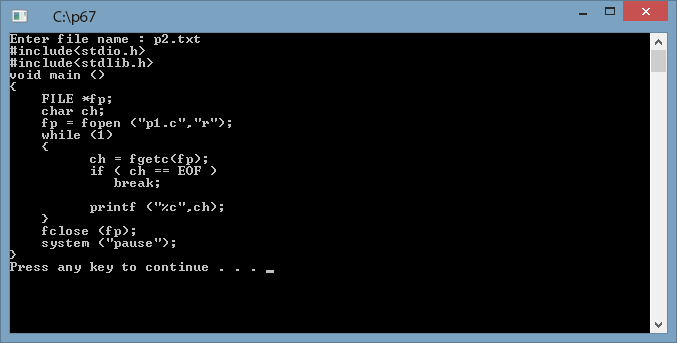
display c source file on the console using fgetc function

0 comments

Problem

Write a C program to open any C source file and displays its content on console. Use fgetc function.

Solution - Code

#include<stdio.h>
#include<conio.h>
#include<stdlib.h>
#include<string.h>
int main ()
{
 FILE *fp;
 char ch;

 fp = fopen ("p2.txt","r");

 while (1)
 {
  ch = fgetc(fp);
  if ( ch == EOF )
   break;

  printf ("%c",ch);
 }

 fclose (fp);
 system ("pause");
 return 0;
}

Sample Output

display source file using fgetc function

Read More..

Copyright 2017. All Rights Reserved. Privacy Policy / Terms And Conditions / Sitemap / Contact